
Apr 17, 2026 · Laurence Taylor
Financial Services Cloud for Insurance: Feature Breakdown vs Custom Objects
If you’re starting a Salesforce implementation for an insurance firm, you’ll face a choice early on: Financial Services Cloud, or standard Salesforce with custom objects. FSC costs more. But it comes with a significant amount built specifically for insurance. This post goes through it feature by feature so you can judge whether the premium is justified for your situation.
An insurance data model that already exists
The most fundamental thing FSC gives you is a data model built for insurance and maintained by Salesforce, with defined objects, fields, relationships, and user interface components ready to go.
| Object | What it represents |
|---|---|
| InsurancePolicy | A single policy record: auto, home, life, annuity, or commercial |
| InsurancePolicyCoverage | A specific coverage on that policy: collision, liability, comprehensive, etc. |
| InsurancePolicyAsset | An insured asset tied to the policy: a vehicle, a property, a piece of equipment |
| InsurancePolicyParticipant | A person’s role on the policy: insured, subscriber, beneficiary |
| InsurancePolicyTransaction | A transaction against the policy: payment, endorsement, cancellation |
| Claim | An insurance claim filed against a policy |
| ClaimItem | A specific item or loss within a claim |
| ClaimCoverage | Links the claim to the coverage being invoked |
| ClaimParticipant | A person involved in the claim: claimant, witness, attorney, third party |
| Producer | An insurance agent, broker, or producer with their own account and contact record |
| ProducerPolicyAssignment | Links a producer to a policy. Supports multiple producers on a single policy. |
| ProducerCommission | Commission amounts allocated to a producer based on split arrangements |
| AccountAccountRelation | Relationships between accounts: household to business, individual to company they own |
Plus many more objects across the full FSC insurance data model.
What this means in practice
With custom objects, you’re building all of this yourself before you can do anything else.
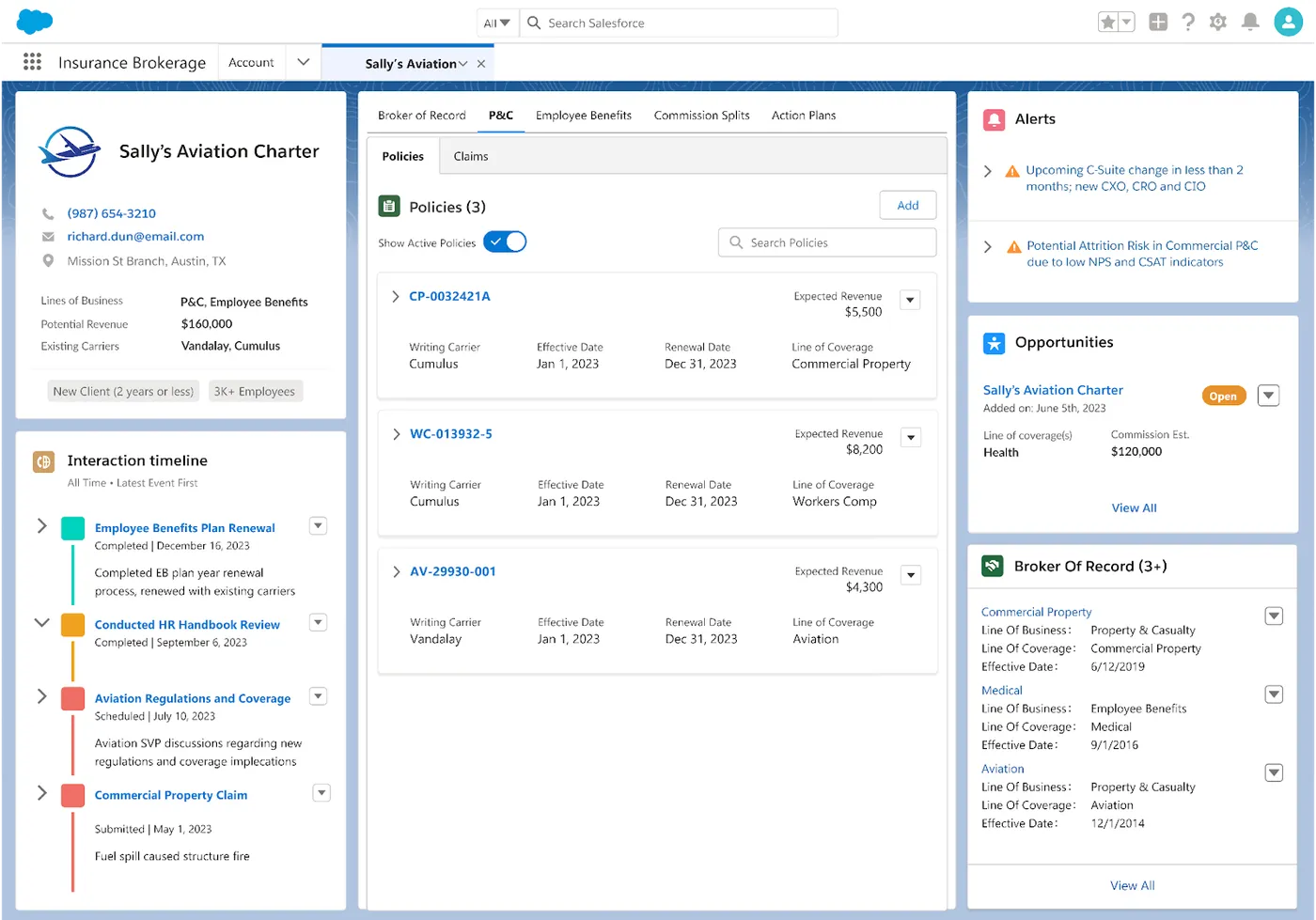
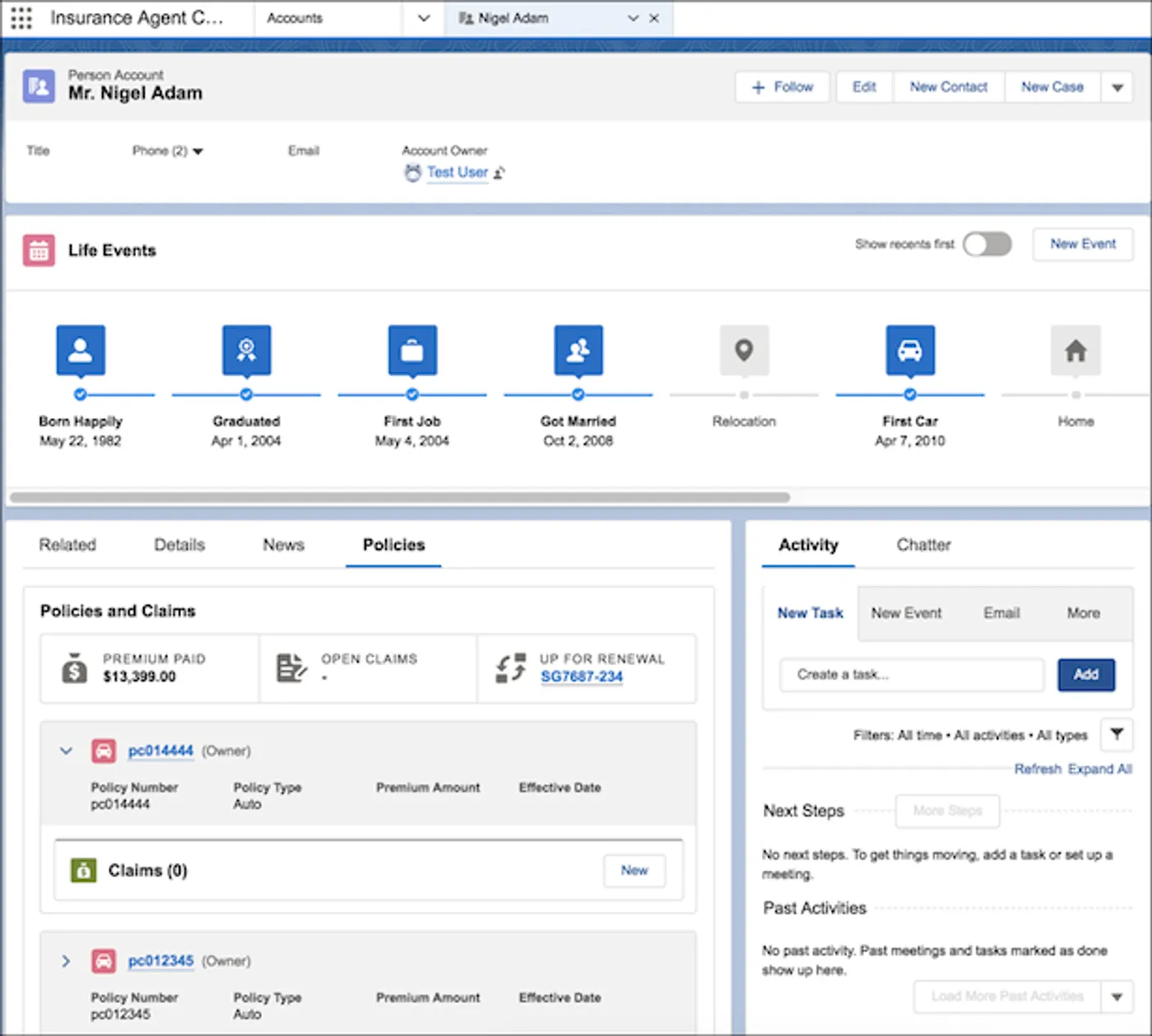
FSC also ships with user interface components built specifically for insurance. These improve how your users move around the system and reduce the number of clicks to get to what they need.
In the first screenshot below you can see several of those components on a single screen: an interaction timeline showing recent activity, a policies section with expandable records and live alerts, and a Broker of Record panel.
In the second, you can see a policyholder’s key life milestones on a timeline, alongside a summary of their policies and claims. Total premium paid, open claims, and anything coming up for renewal are all visible without digging into individual records.
An AppExchange ecosystem built for FSC
One of the less obvious costs of building on custom objects is the broader ecosystem you leave behind. Salesforce launched insurance capabilities in FSC in 2019, and in the years since, vendors across AppExchange and beyond have built their integrations around it. A significant number of insurance-specific tools are built against FSC’s data model, and that number keeps growing.
| Tool | Type | Who it serves | What it does |
|---|---|---|---|
| btcore | AMS | Agency · Broker | AMS covering pipeline, policy management, accounting, and commissions built on FSC |
| Amplo (formerly Veruna) | AMS | Agency · Broker | Full AMS with CRM, policy admin, and accounting on Salesforce |
| Precise AMS | AMS | Agency · Broker | Full AMS with IVANS downloads, ACORD forms, and commission processing on FSC |
| Applied Epic for Salesforce | AMS | Agency · Broker | Bidirectional sync between Applied Epic and FSC for accounts, contacts, policies, and activities |
| Guidewire | Policy Admin | Carrier · MGA | Surfaces policy admin system data into FSC for service reps without duplicate data entry |
| Duck Creek | Policy Admin | Carrier · MGA | Surfaces policy admin system data into FSC for service reps without duplicate data entry |
| AgentSync | Compliance | Carrier · MGA · Agency · Broker | Automates producer licensing and appointment compliance via NIPR integration |
| Bold Penguin | Quoting / Rating | Carrier · MGA | Multi-carrier commercial quoting connected to FSC account data, with AI submission intake |
| bolt | Quoting / Rating | Agency · Broker | Compare quotes across multiple carriers from within Salesforce |
The common thread: these tools were built for FSC’s data model. Whether they work with a custom objects org depends on the vendor, but at minimum you’re looking at custom integration work to bridge the gap, and some features simply won’t apply.
Platform tools every insurance firm gets
Beyond the data model, FSC includes a set of platform capabilities that apply to every insurance firm regardless of line of business. These ship with FSC, not as extras.
Actionable Relationship Center (ARC)
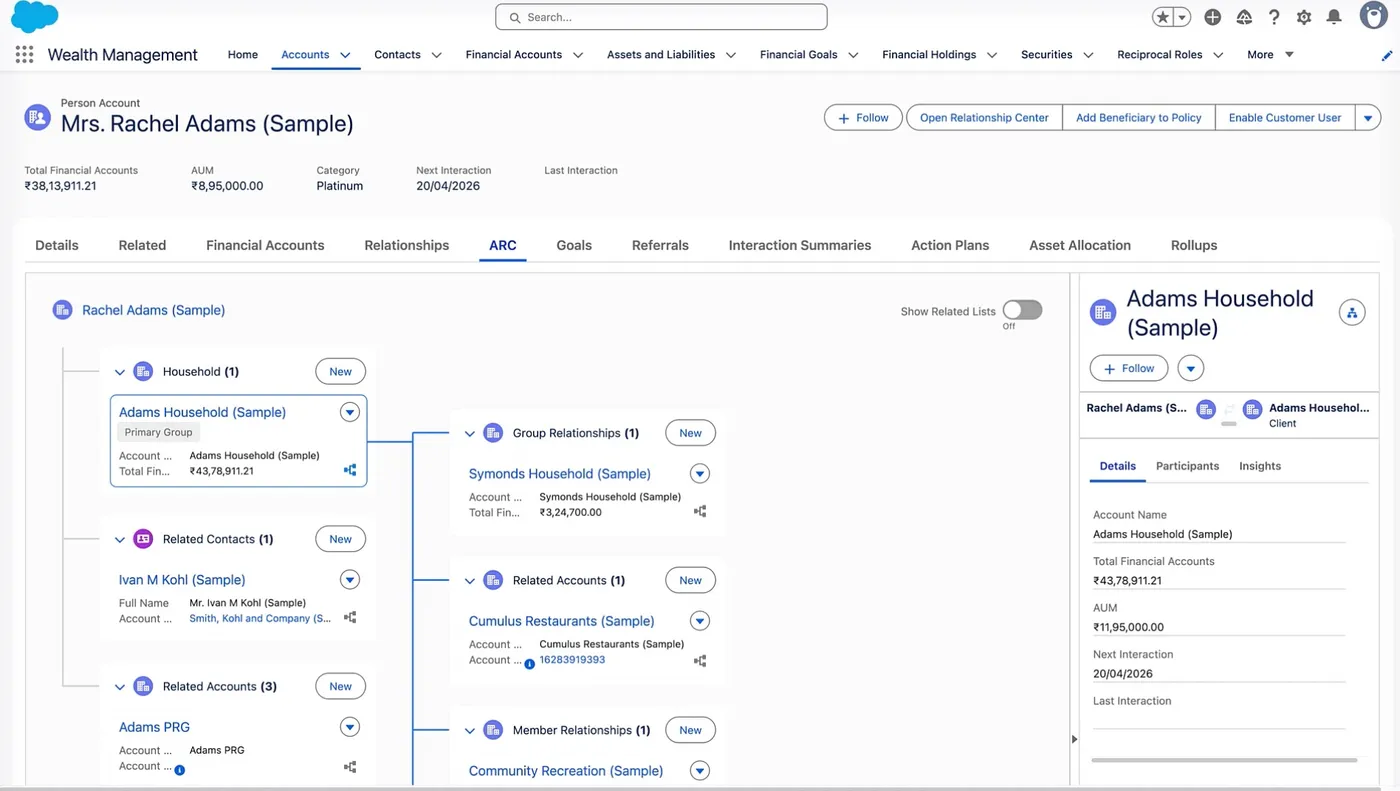
ARC maps a customer’s relationships as an interactive graph on a single screen. From one view you can see:
- The household and the individuals within it
- The businesses they own
- Their policies and claims
- How everything connects
You can view, edit, and create records directly from the graph without navigating away. On a custom objects org, you’re building that view yourself across multiple page layouts and related lists. Whether users actually navigate all of them is another story.
Want to see it in action? Watch Salesforce’s short ARC overview video ↗
Action Plans
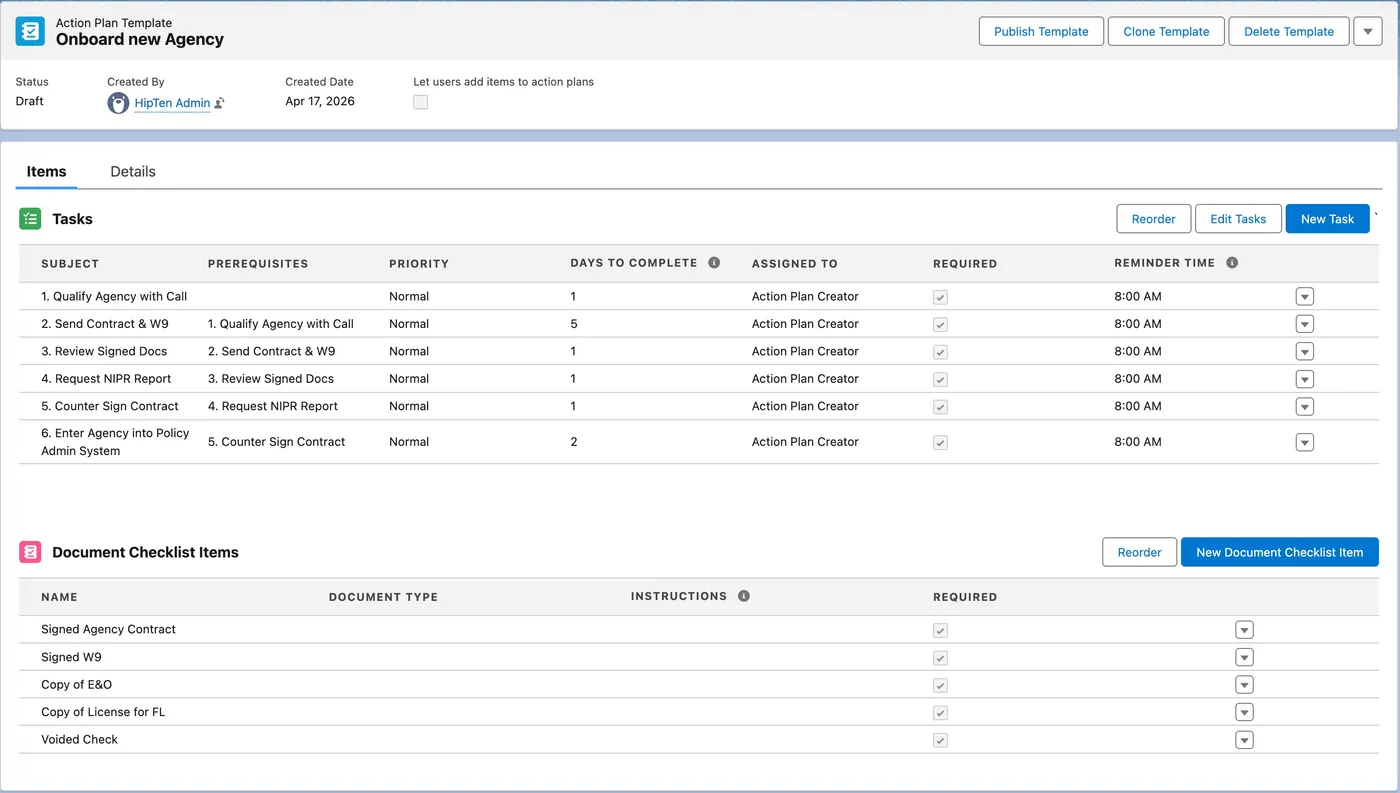
Action Plans let you define a templated task sequence and run it against any record. You set it up once:
- Tasks with assigned owners and deadlines relative to a start date
- Dependencies so a task can’t start until its prerequisite is done
- Business hours so deadlines never land on weekends or holidays
A policy renewal is a good example. When renewal season hits, the Action Plan creates every step automatically: renewal notice, coverage review meeting, carrier submission, follow-up, binding confirmation. Each task goes to the right person, deadlined from the plan start date.
Templates are managed by your team, not your Salesforce admin. If the renewal process changes, someone on your ops team opens the template and updates it. No ticket, no deployment. Each team can maintain their own templates with their own sequences. And when the time is right, your admin sets up an automation to trigger the plan automatically.
A few other things worth knowing:
- Task assignment works against queues, roles, or specific individuals, not just named users
- Completion tracking shows how many tasks are done across active plans at a glance
Business Rules Engine (BRE)
BRE lets your business team build and maintain rules that Salesforce can evaluate and act on, without involving a developer.
You define the rules in a table. When a record meets those conditions, Salesforce evaluates it automatically and takes action: update a field, create a task, route to a queue. When the rules change, your team edits the table. No deployment. No developer needed.
A few examples of what that looks like in practice:
- Underwriting appetite: if the state is Florida, coverage type is wind, and TIV is over $5M, return “refer to senior underwriter”
- Commission tiers: calculate a producer’s commission rate based on premium volume and loss ratio
- Renewal routing: if a policy is up for renewal and the account has an open claim, route to a senior account manager
The business logic lives in BRE. The people who understand that logic are the ones maintaining it.
Interaction Summaries
Interaction Summaries are structured call and meeting notes attached directly to account records. Beyond what you’d capture in a standard activity, they give you:
- Attendees, communication type, date, and notes in a structured format
- Channel and format so you can record whether the meeting was in person, by phone, or remote
- Purpose of the interaction so there’s context around why the conversation happened, not just that it did
- Role-based confidentiality so sensitive notes are only visible to the right people. A sales manager’s notes from a carrier negotiation don’t need to be visible to every producer in the org. Standard Salesforce Tasks and Events have limited visibility controls. Interaction Summaries give you more flexible sharing rules to keep sensitive information private.
- A visual interaction timeline showing all touchpoints across the account at a glance
- Searchable across your org so you can find past interactions by keyword, account, or participant
- Customisable tags on each interaction so you can categorise and filter by whatever matters to your team
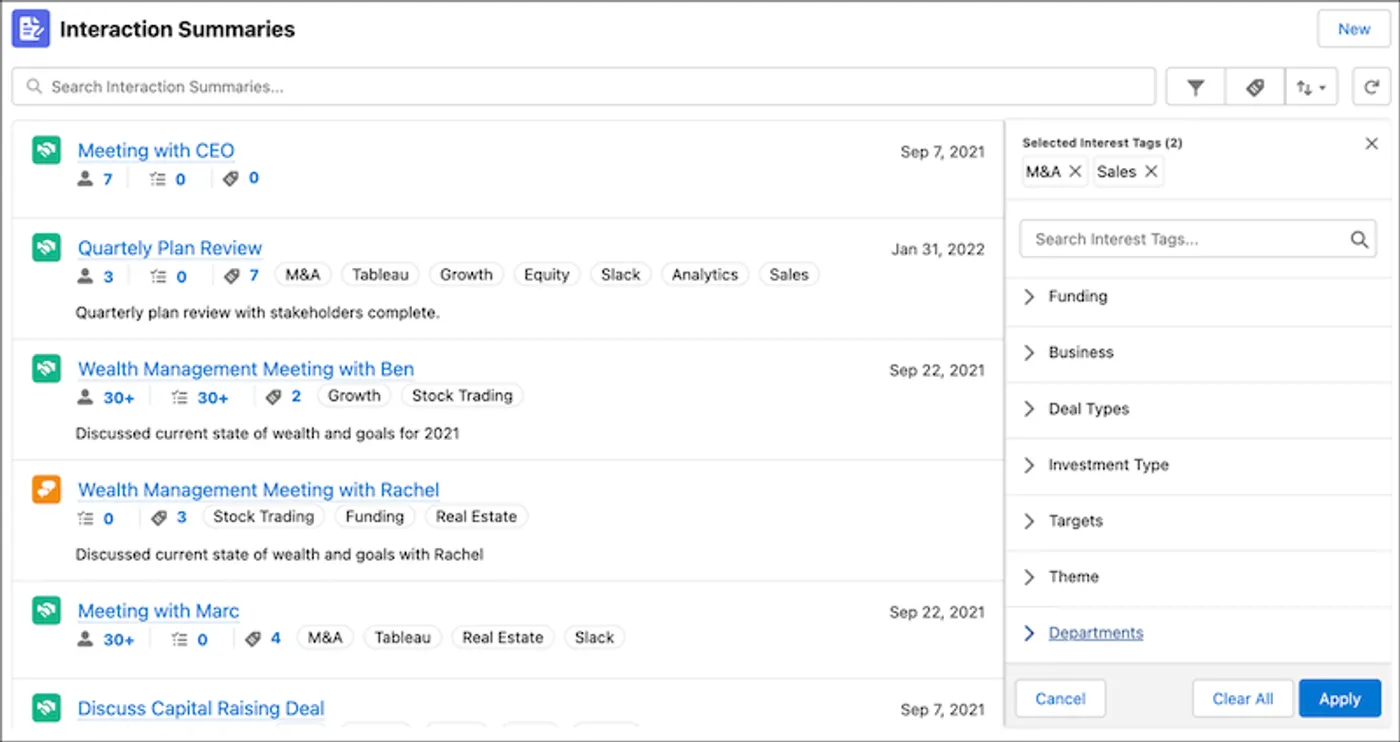
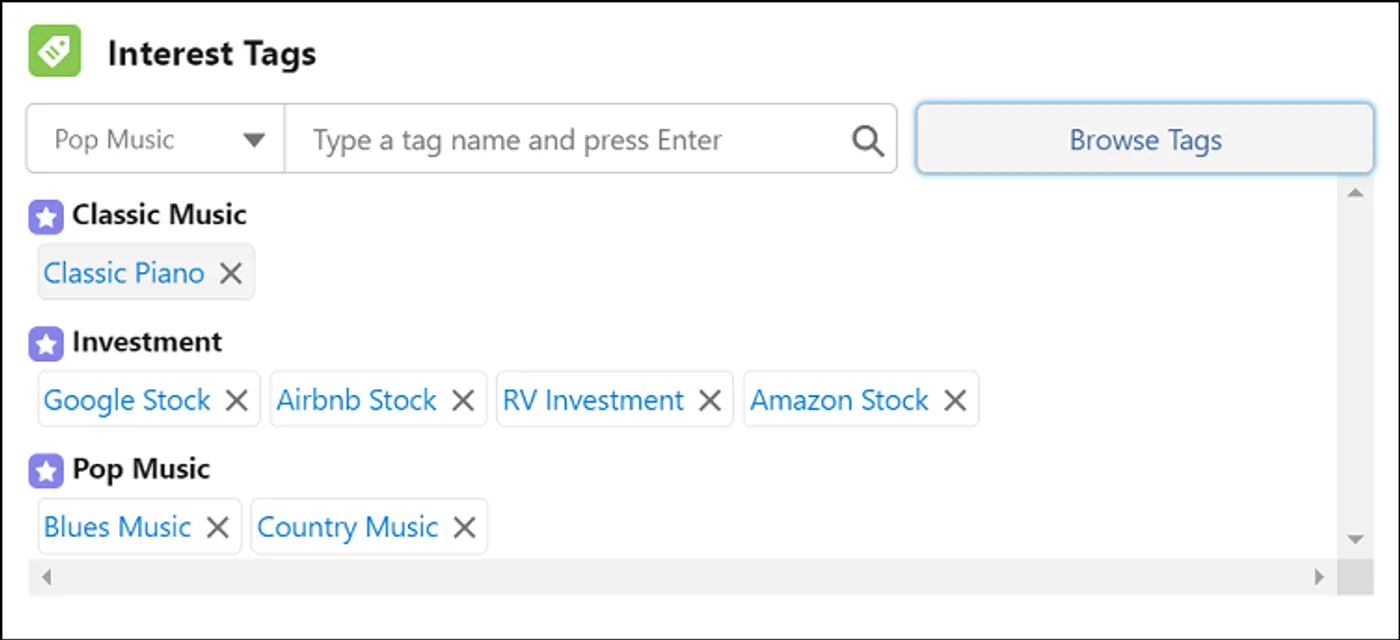
Interest Tags
Most CRM systems let you filter clients by what they are: industry, policy type, revenue band. Interest Tags let you filter by who they are.
Tag your clients
Boat owner. Business owner. Golfer. Approaching retirement. Applied from any record page in seconds.
Then filter on combinations
Boat owners with a commercial policy. Clients interested in expanding coverage who you haven’t spoken to in 90 days.
Your producers build a better picture of each client over time. When a renewal comes up, a product launches, or a campaign goes out, you pull exactly the right list. Tags are set up by your admin and applied from any record page. No deployment needed to add new ones.
Events and Milestones
Events and Milestones tracks significant changes in a client’s life or business directly on their account record, visible to any producer who opens it.
Personal lines clients
Born, graduated, first job, got married, first car, new home. Producers can see where a client is in life before picking up the phone.
Commercial clients
A new CEO, an acquisition, a new product launch, a major investment. The context that changes what coverage they need and when it’s worth reaching out.
Each event can trigger an automatic action. A marriage event kicks off a coverage review opportunity. A new acquisition starts an Action Plan. An upcoming renewal creates the right tasks at the right time. For producers managing a large book, this is the difference between reactive service and proactive engagement.

Rollup By Lookup (RBL)
Salesforce admins will know this pain: rollup summary fields only work on master-detail relationships. FSC’s insurance objects like InsurancePolicy and Claim relate to Account via a lookup, so standard rollups don’t work on them.
Rollup By Lookup solves this without Apex triggers and without a third-party product. It’s configured directly in the UI. You define which objects and fields to roll up, and FSC pre-calculates the aggregations in the background:
- SUM and COUNT across claims, policies, financial accounts, and other supported objects
- Results stored on the parent record so pages load fast
- No custom code, no third-party tool, no developer needed
For admins, it removes one of the more frustrating workarounds in a standard Salesforce build.
AI on top of your insurance data
Agentforce is Salesforce’s autonomous AI platform. It doesn’t just surface information. It acts. It can execute multi-step workflows on its own, within the boundaries you define: check coverage, create a claim record, assign an adjuster, send a confirmation. No human clicking through each step.
What ships out of the box for insurance
Because your data lives in FSC, Salesforce’s pre-built Insurance Service Assistant already knows your business. When a customer calls in, it surfaces a summary for the CSR immediately: active policies, coverage limits, deductibles, claims history, and policy status. If they’re asking about a quote, it pulls that too: coverage options, premiums by line, underwriting conditions, expiry date. The CSR has full context before the conversation starts, without touching a single screen.
More Custom Use Cases
All of this works because FSC’s data model gives Agentforce the context it needs. It already understands what an InsurancePolicy, a Claim, and a Producer are. On a custom objects org, you’d need to teach the agent your data structure before it could do any of this.
First Notice of Loss (FNOL) via AI chatbot
The agent identifies the policyholder, confirms the policy, collects incident details, validates coverage in real time, creates the claim record, routes it to the right adjuster, and sends a confirmation with the claim number. No CSR required for intake.
Autonomous policy servicing
A policyholder contacts the insurer to update their address after moving. The agent verifies identity, processes the change, re-quotes for the new location, and presents the updated premium for the customer to accept.
Producer meeting prep
Before a client call, the agent surfaces that client’s policy data, renewal dates, claims history, and recent interactions. Producers walk in prepared without spending an hour pulling records.
Underwriting triage
The agent pulls a new submission, checks it against underwriting rules in Salesforce, flags completeness issues, and routes it to the appropriate underwriter by risk tier. The underwriter reviews rather than sorts.
If you’re a brokerage or agency
In February 2025, Salesforce released FSC for Insurance Brokerages. It’s purpose-built for how brokerages make money and manage client relationships.
Commission processing
Upload your carrier commission statement as a CSV. Salesforce maps the fields, matches each line to the right policy, calculates producer splits, and creates commission records automatically.
Supported commission types:
- Flat fee
- Percentage of premium
- Graded percentage
- Per-employee amount
Expected commissions roll up at the coverage and policy level, so you can see what you’re owed before the statement arrives.
Producer split arrangements
Two options for defining splits:
- Explicit splits — fixed percentages assigned to named individuals
- Role-based splits — percentages assigned to roles instead of people. When a producer moves on, you update one role assignment rather than rewriting every arrangement they were part of.
BOR (Broker of Record) tracker
Winning a BOR is easy to lose track of without a process behind it. The BOR tracker manages the transition as a structured workflow:
- Documentation and progress tracking
- Client communication log
- Onboarding steps and status
You can run multiple BOR records for the same client across different lines of coverage simultaneously.
Employee Benefits Servicing
Account managers handling group benefit renewals get a consolidated view of plan tracking, carrier coordination, and renewal actions. The workflow supports both fully-insured and self-insured plans. Plan templates standardize definitions across carriers. Real-time data surfaces potential adjustments when a client is exploring renewal options.
Distributor Performance Management
Sales managers can track individual producer and distributor performance through dashboards built into account and contact record pages. The DistributorAuthorization object models appointments and relates them to producers and policies, giving you visibility into who is licensed and appointed to sell what, in which states.
For carriers and MGAs who administer group plans directly, Salesforce’s Digital Insurance Platform add-on extends this further with dedicated enrollment OmniScripts for dental, vision, and bulk member enrollment.
Pre-built processes you don’t have to build
FSC ships with a library of pre-built OmniScripts for common insurance workflows. These are documented, deployable templates. You clone them, configure them for your org, and activate them. You’re not building the logic from scratch.
Claims intake (FNOL)
The auto FNOL OmniScript walks through ten steps: retrieve policy data, select the involved vehicle, specify the loss type, enter incident details, evaluate coverage eligibility, confirm coverage, collect additional damage and injury information, create the claim record, run rules evaluation, display confirmation with claim number. A property FNOL variant handles homeowners and property claims with the same structure adapted for structure and contents damage.
Policy endorsements
Five endorsement flows ship pre-built: add a vehicle, remove a vehicle, add a driver, remove a driver, modify coverages. Each one retrieves the current policy, presents the relevant input, recalculates the premium automatically, creates a new policy version, and confirms the change.
Quoting
An auto quoting flow collects driver and vehicle information, retrieves eligible products and rates, presents coverage options, and creates the quote record. A small business quoting flow covers commercial lines with the same pattern. A quote proposal flow generates the formal proposal document from an existing quote.
Policy issuance
The Issue Policy OmniScript converts a quote to a policy. It walks through payment plan selection, billing setup, payment method, and payment frequency, then creates the policy record. Modal premium calculations are handled automatically.
Servicing
Pre-built flows for address updates, one-time payments, ID card and proof of insurance requests, and policy cancellation with pro-rata refund calculation.
Note: “Pre-built” means clone-and-configure, not install-and-done. You’ll configure these for your org’s fields, branding, and decision matrix rules. But the structure, the steps, and the service calls are already there.
Reporting and compliance
CRM Analytics for FSC
CRM Analytics for FSC is a separately licensed add-on that installs a managed package of pre-built insurance dashboards. The Analytics for Insurance app covers policy pipeline, claims SLAs, producer performance, adjuster productivity, average claim duration, claims by type and severity, and risk analysis. These dashboards are built against FSC’s data model, so they work without any custom report building.
Complaint Management
Complaint Management is built into FSC. It’s a structured workflow from complaint intake to resolution: guided intake flow, SLA tracking with auto-escalation when response windows are missed, marketing suppression while a complaint is active, role-based access control so sensitive complaints stay visible only to the right people, and dashboards tracking volumes, trends, and systemic issues across the organization.
For carriers this has a regulatory dimension. State insurance departments track complaint ratios publicly through the NAIC Consumer Information Source database. Carriers with high ratios face scrutiny. FSC’s complaint management gives you the audit trail and response-time tracking that market conduct exams require.
What building on custom objects actually costs
Custom objects aren’t the wrong choice. For simple use cases or firms with very specific requirements that don’t fit FSC’s model, they can be the right call. But the cost comparison usually understates the gap.
A custom objects build requires you to design a data model that FSC ships pre-built, build the process logic that FSC includes as configurable templates, build or buy every reporting capability from scratch, custom-integrate every AppExchange tool your team would otherwise turn on, and maintain all of that across every Salesforce release.
The recurring cost is the part that gets underestimated. FSC’s objects, flows, and dashboards are maintained by Salesforce. When a new feature ships, it’s built against a data model your org already has. With custom objects, your team takes on that maintenance.
There’s also the AI consideration. The pre-built Agentforce insurance capabilities work because the platform knows what InsurancePolicy, Claim, and ProducerCommission are. On a custom objects org, you’re either restructuring your data model before you can use those capabilities, or you’re building custom AI actions from scratch.
Neither path is free. The question is where you want to spend.
What you can grow into
FSC is a platform, not a point solution. As your needs expand, there are add-ons that extend it without requiring a rebuild.
CRM Analytics for FSC adds the pre-built insurance dashboard layer described above, installed directly on top of your existing data.
Salesforce’s Digital Insurance Platform is a separately priced add-on for firms that need to move beyond CRM into policy administration, claims management, or group benefits enrollment at carrier or MGA scale. It requires FSC as its base. You’re extending what you already built, not replacing it.
Process Compliance Navigator embeds regulatory compliance validation directly into your workflows. Before an action executes, it checks against the applicable requirements and blocks anything non-compliant. For insurance: state-by-state policy issuance requirements, claims handling timeframes, agent licensing verification. It’s a separate licensed add-on.
The pattern across all of these is the same: you’re extending FSC, not replacing it. That’s worth something when you’re planning a multi-year technology investment.
Talk to us about FSC for your firm
Connecting Applied Epic to Salesforce: The Real Story
Two paths, real costs, and what we've actually learned after implementing this integration for multiple agencies.
Hipten and PipeLaunch Partnership
HipTen partners with PipeLaunch to automate prospecting and data enrichment for Salesforce users.
5 Salesforce Strategies to Elevate Your Agency Above the Competition
Five practical Salesforce strategies insurance agencies can use to stand out, from live chat to self-service portals.
We can help.
We implement Salesforce exclusively for insurance organizations. If you're tackling something similar, get in touch.